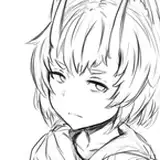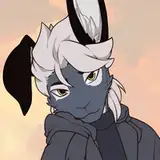
The 'Vix' is a species defined by its Cat, Fox, and Rabbit-like characteristics, with The Vixine being an example of cat-dominant, fox secondary physiology. A variety of mix-and-match blendshapes let you tune up your look for this sporty creature!
This avatar is currently only available and supported through Gumroad. V2 may see a broader launch though!
--
All customization is available to tinker with on the demo model, available at the Public Demo World!
For links to a number of official and add-ons like skins and clothing, I link everything at the top of the official Vix webpage. Check it out for a fun feature tour so you know what you're getting into!
HECKA.SPACE/VIXFor Announcements, follow and join:
TwitterVRC GroupDiscord access is recommended by gumroad after purchase. Alternatively, it's accessible through subscribing on Ko-fi, or simply by being cool and hanging out.
You can verify your purchase for a fancy role, Come say hi! Otherwise, please contact me @ HeckaDecima on twitter for any immediate support needs.
- Unity Package (Unity 2022 + corresponding VRC SDK)
- Working Files (Blender 4.0, FBX, Substance 9.1.1, PSD (exported from substance, requires additional setup)
- Clean exported textures of the clothing, no extra setup required
//Required installs:
- VRC Creator Companion - manages your unity file and makes installation of other files easy
- VRCFury - Required as of 1.2. A 1.1 all-in-one version remains available as a legacy download, but is unsupported
- Poiyomi Version 8.1 or up - Required to see/edit most of the default materials.
- Further instructions are in the downloads page, just under the unity package!
- Read the title cards, my wife worked very hard on them! Then you can read more at hecka.space/vix
- PC ready at Medium quality at 41k tris (slightly more with 1.1, updating cards/numbers soon), with Good performance possible with some clothing and bones discarded (<32ktri, max 4 bones), limiting textures to 2k/1k, etc.
- Fullbody compatible, with legs that do fun things with foot tracking. Check the Digitigrade+ toggle in settings!
- MMD compatible visemes and a suite of manual 2D puppets for nuanced face control
- uses Poiyomi 8.1 (Toon Outline by default), to take advantage of UVTile Discard to hide body and clothing parts. A number of other features also control variables within the shader through toggles and animations.
- Extra geo options and textures not in the demo. Peruse twitter for more info.
- a suite of alternate poiyomi-based materials that allow you to edit the color palettes of the original 3 body patterns directly in unity.
//Avatar does not have, but will likely see support down the line for:
- An animation/posing rig. This is on my shortlist! The default blender file is currently an FK only figure, with leg constraints to demonstrate the way the VRC rig is handled, allowing for better clothing add-on testing.
- custom locomotion animations/poses. It comes pre-loaded with stock GogoLoco to give it some flair. IF GOGOLOCO IS A SELLING POINT TO YOU, please consider dropping a tip for the creator, Franada, by purchasing it for their asking price or more! This also grants you any future updates to the system. I do want to adjust some animations to make them play better with the vix's particular leg shapes.
- Quest version - This is currently doable, with a lot of editing and optimizing on your part. I'm working on a quest-ready version and have a test demo up! Until I'm comfortable with the performance, I'm not advertising it as quest ready, so if you're looking to do so I ask you know what you're doing already. I offer no refunds after you've acquired the files.
Follow instructions on the discord to use the above key, granting you the Vixine verification! The discord role is required for people to share files and perform commission work on the model, and grants access to several resource channels.
Update 2.0.2 (this should be the last patch for a long time!)
a support bundle of UV layouts and blank shading exports for use with older versions of substance (or analogues like UCUPaint) is incoming soonish. Please check this Trello for more details on what's going on!
//INSTALLATION
1- Getting things installed if this is your first time: Use VRChat's Creator Companion to install the correct version of unity and the SDK. It makes sure you get the right stuff! Once you have CC set up, click Create Project. Select "Unity 2022 Avatar Project". Name it, put the folder somewhere reasonable like "My documents/VRChat/Avatars/"
2- Getting some tools set up: In the Settings panel of CC, go to the Packages tab, then click '+ Add Repository' on the right. Grab the repo location for VRCFury and Poiyomi and drop them in, then tick the checkmark for both if they're not on already.
Optionally, consider installing GogoLoco and Jerry's Face Tracking, depending on your interests and needs.
2.5- on the creator companion projects view, click 'manage' on your vix project. Find Poi and VRCF, and hit the white (+) icon to their right to install them
3- Open your project! This may take a moment. When it's up, drop the latest "The Vixine" unity package file into the 'Project' area.
4- Open "Assets/Vixine/The Vixine V2 TOUR", this is the demo map! It will give you a breakdown of features, optimization tips, and more. When you're done, duplicate the 'Starter File', rename it to your liking, and begin customizing the vixine within.
You may unpack the main prefab if you know what you're doing, else enable/disable clothing and menu items by setting the 'editor only' tag on an item's tag dropdown.
//OLD VERSION DOWNLOAD
Due to recent events, the download is SFW by default. (this is a feature I was planning! Just... not like this). For an informational .unityasset regarding work safety standards, please visit hecka.space/vix/OSHA. You must be 18 and over to receive forklift certification for cats.
If you find any issues, hit me up through discord, or any of my other socials listed at hecka.space
Thank you so much!